

Erases temporary files and scans the registry for obsolete files. Displays various paths for apps and removes empty directories.
Junk files, unnecessary installation leftovers, and other unwanted data tend to pile up on your system inadvertently, choking your PC’s performance. CCleaner can chase and detect all those unwanted or unneeded files for you and wipe them out in seconds and for free, giving your disk some more ‘breathing room’.
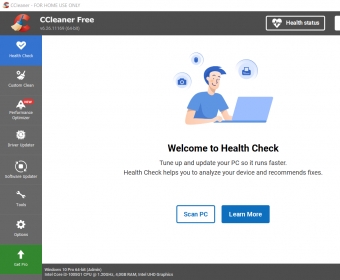
CCleaner performs a thorough check of your computer’s health status in just a few seconds/minutes depending on the size of your disks. It focuses in four fundamental areas – privacy, space, speed, and security. ‘Privacy’ will take care of all those online trackers and cookies and what-not that your browser cannot block while surfing the Web. ‘Space’ will look for unwanted or not-needed-anymore files that can free up disk space when removed for you to store other more interesting data. ‘Speed’ and ‘Security’, though present in the scan results, are not available for users of the Free version. You’ll need to upgrade to the Professional version to enjoy their magic. (If you move around the program a bit, you’ll find some more options that are there just as a decoy to lure you to enjoy the extensive functionality reserved to Pro users.)
To enlarge its standard cleaning capabilities, CCleaner includes a ‘Registry’ section that looks for unused file extensions, missing DLLs, ActiveX and Class issues, type libraries, and a lengthy list of other broken or missing registry items that may be making things worse for your OS. Finally, as a bonus, you’ll find a toolbox with some neat and useful options, such as a duplicate finder, a startup manager, an uninstaller, a system restore option, and some more utilities.
The Free version of CCleaner is a basic and hassle-free way of keeping your computer clean and running smoothly in just a few seconds. Despite what certain manufacturers say, your PC won’t start running as new just be freeing up some disk space but getting rid of unneeded files and maintaining a clean Windows registry will surely help your OS to perform its tasks. Remember that you can always upgrade to the Professional version for a wealth of functions and useful utilities.






Comments (253)
Type in Search Bar > ccleaner 6.39 download > Scroll down to SoftPortal (Download CCleaner 6.39.11548 for PC) > choose download from SoftPortal servers (EXE file). Don't download from "official site" as they only offer the new release 700. You could probably use Techspot or informer.com as well.